


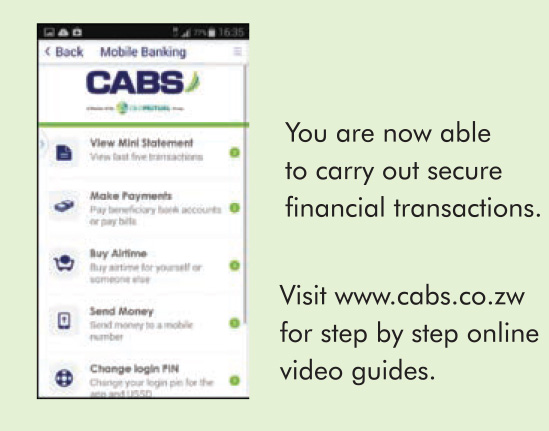
Welcome to the new and improved CABS Mobile Banking App. The App allows you to view your account anytime, anywhere. You can make bill payments, transfer money and buy airtime, but it has some great new benefits:
- It’s faster and more intuitive to use
- You can save frequent payment details under ‘favorites’
- You can purchase Zesa pre-paid tokens
- You can link to multiple bank accounts to the App
How to switch over to the new App
- Remove the current App from your phone.
- For Android phones go to Settings, then open Application Manager, locate the current App and select UNINSTALL.
- For iOS press on the current App icon and select DELETE.
If you haven't downloaded the CABS Mobile Banking App for FREE yet, visit a CABS Branch to register for Mobile Banking. Then dial *227# and enter the activation code on your receipt. Then you can download the new App and enjoy banking convenience anytime, anywhere.
Video Tutorials
Introducing CABS Mobile Banking App
Getting Started with CABS Mobile Banking App - Part 1
Getting Started with CABS Mobile Banking App - Part 2
Tutorial 1: Transfer to CABS account
Tutorial 2: Transfer to non-CABS account
Tutorial 3: Send Money
Tutorial 4: Buy airtime for yourself
Tutorial 5: Buy airtime for others
Tutorial 6: Pay bills
Tutorial 7: Get Mini Statements
Tutorial 8: Exchange Rates
Tutorial 9: Locate branch or ATM
Which Cell phones are supported
- Apple iOS 4 and above – visit the Apple AppStore
- Android 2.3 and above – visit the Google Play Store
What can I do on the app?
- Money transfers to CABS accounts and other bank account
- Buy airtime for yourself or another mobile number
- Pay bills (such as DStv, ZESA (postpaid), ZESA (prepaid), City of Harare, City of Byo, uMax, TelOne, CIMAS).
- View mini-statements.
- View daily foreign exchange rates
- Locate nearest CABS Branches and ATM’s
Charges
The app is free to download and there is no monthly subscription.
| TRANSACTION | CHARGE |
|---|---|
| Airtime purchase | No charge |
| Mini- statement | 12c |
| Transfer to CABS account | 55c |
| Transfer to another bank | $1.05 |
| Pay bills | 55c |
Activation Process
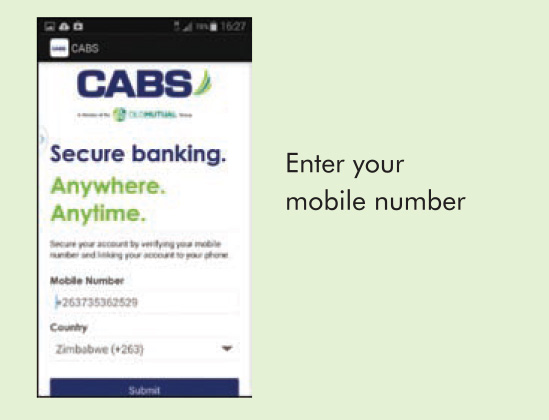 |
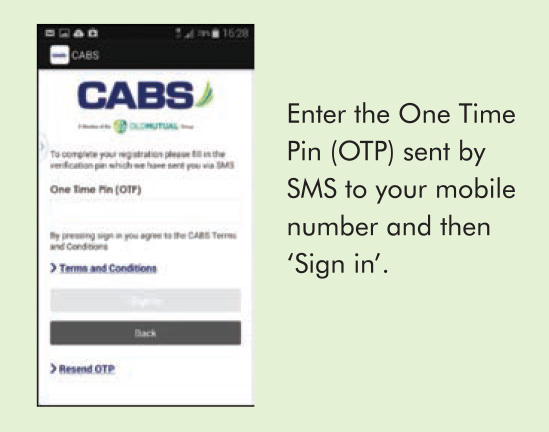
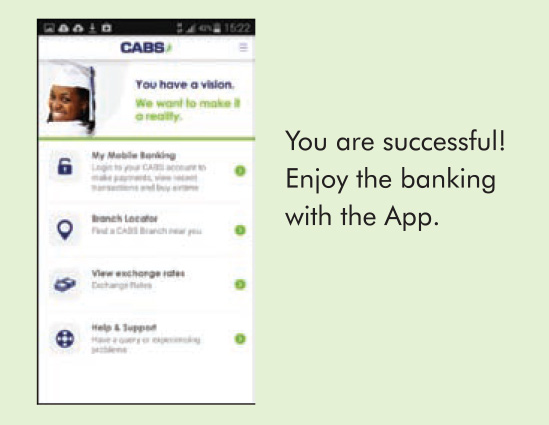
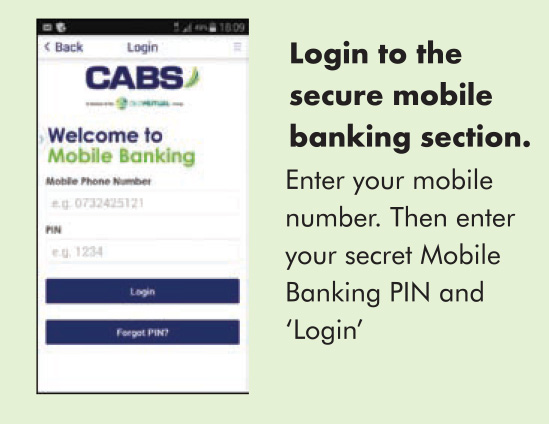
HOW DO I GET THE APP? 1. If you are not registered for Mobile Banking. Take a few minutes to register at your nearest CABS Branch. You will require your cellphone and your bank card (Plantinum, Gold, Blue, Easybank or Textacash). Then follow the instructions below. 2. If you are registered for Mobile Banking, you can download the App immediately. 3. Visit your phone’s app store and search for 'CABS MOBILE BANKING APP'
4. Download, install and open the App. 5. Follow the easy on screen instruction to activate the App.
|
|
 |
||
 |
||
 |
||
 |
FAQs
Where do I register for mobile banking?
CABS Branch & Agents.
Which account type can be registered on mobile banking?
Platinum, Gold Class, Blue Class, Textacash, Scheme Cards & FlexiCredit card
Can I register more than one account on mobile banking?
A maximum of 4 accounts can be registered on one mobile number.
What is the CABS mobile banking short code?
*227#
How do I reset my forgotten pin on Mobile Banking?
Visit your nearest CABS Branch for deregistration on mobile banking. The branch re-registers and you will be requested to set a new Mobile Banking Pin.
How do I get the Mobile Banking App?
If you are already registered for Mobile Banking, you can download the app from the relevant app stores depending on the device
- For Android devices, go to Google Play store. The supported devices are those running Android 4.0.3, and above.
- For iOS devices, go to the Apple App Store. The supported devices are those running iOS 4 and above.
Can I use the App when I’m overseas?
Yes, provided you have activated international data roaming, alternatively you can use a data enabled sim card for the country visited. You can also use the App without roaming by accessing a secure Wi-Fi network, you must have downloaded and activated it before leaving Zimbabwe.
NB: The international roaming costs are charged by your service provider.
How does the branch and Agent locater on Mobile App work?
It helps you locate your nearest CABS branch or Agent.
How do l use the exchange rate on mobile app?
By selecting a currency to convert from, kindly note all conversions are to US Dollar only
Which reference code should I input when sending money to another bank (ZIPIT)?
Put anything meaningful relating to the transaction e.g. school fees, rentals, repayment of debt, etc.
What is the charge for a ZIPIT transaction?
$1.05
Which Bills can I pay for on Mobile Banking?
DSTV ; ZESA ; AFRICOM; CORPSERVE; CREDFIN; ZOL ; CIMAS ; UMAX; City Of Harare; City of Bulawayo ; TelOne; Old Mutual Products (Balanced Fund, Equity Fund, Mutual Life, Money Market Fund, Gross Money market Fund & Property Fund) and over 40 schools listed on the CABS website.
What is the minimum amount for ZESA token purchase on mobile banking?
$10 minimum - $999.99 maximum
How do l retrieve a ZESA token on mobile banking?
Dial *227#, select bill payments ,select bill provider, select ZESA prepaid, and choose option 2 “Retrieve last token”
How do I register for Ecocash on CABS Mobile Banking?
Dial *227#, select option 6 “Ecocash services” and choose the registration option.
What is the Ecocash transfer charge on Mobile Banking from my Bank Account to my Ecocash Wallet?
1% of the amount + 5c
How do I transfer funds to Ecocash via mobile banking?
Dial *151#, select option 8 –“Banking services “and then select the relevant option.
CABS Mobile Banking Call Centre
Direct lines: +263 4 851331-3; 8514132; 870863
WhatsApp: +263 772 149 434
Toll free (on Econet): 08080012 – 4; 08080021; 08080102